
Vibe Coding in 2026: Why AI Coding Agents Are a Double-Edged Sword for Dev Teams
We've been shipping production software with AI coding agents for over a year now. Claude Code, Cursor, Copilot - they're part of our daily workflow at Rocky Soft, and we'd never go back to writing every line by hand. The speed gains are undeniable.
But here's what nobody putting out "Top 10 AI Coding Tools" listicles wants to admit: vibe coding without engineering discipline is just generating technical debt at machine speed. We've seen it in our own work, we've seen it in client codebases we've inherited, and the industry data is starting to confirm what practitioners already know.
This is our honest take on where vibe coding actually stands in 2026 - what works, what breaks, and what your team needs to get right before trusting an AI agent with production code.
What We Mean by Vibe Coding
For anyone still catching up: vibe coding is the practice of describing what you want in natural language and letting an AI agent write, refactor, and iterate on the code for you. You guide the direction. The AI handles implementation. The term was coined by Andrej Karpathy in early 2025, and it's since become the dominant conversation in software development. MIT Technology Review included generative coding in its 2026 Breakthrough Technologies list - it's no longer experimental. It's mainstream.
The tooling has matured fast. In 2024 you had a handful of autocomplete-style assistants. In 2026, tools like Claude Code, Cursor, and Replit give AI agents the ability to read your full codebase, execute commands, run tests, manage files, and iterate autonomously across multiple files. They don't just suggest code - they reason about architecture, debug across modules, and produce deployment-ready output.
We use these tools every day. They are genuinely powerful. And they are genuinely dangerous if you don't know what you're doing.
The Speed Is Not Hype - We've Measured It
Let's be concrete. On a recent client project, we used Claude Code with a subagent workflow - specialized agents for backend, frontend, and architecture - to scaffold a NestJS API with full CRUD operations, Swagger docs, validation, and test stubs. What would have been a full day of boilerplate work took about 40 minutes, including review.
This isn't unique to us. Torsten Volk, an analyst at Omdia, recently documented a similar experiment where an AI agent built a complete Streamlit dashboard - including API integration, Docker deployment, and documentation - in under 45 minutes. The same work would have taken most of a developer's day.
The real acceleration isn't in writing code faster. It's in collapsing the surrounding work: config files, boilerplate, test scaffolding, documentation, deployment scripts. That's where developers lose hours, and that's where AI agents deliver the most value. The architectural decisions, the trade-off analysis, the "should we even build this" conversations - those still require a human brain.
At companies like Microsoft and Google, AI now reportedly accounts for 25-30% of all new code being committed. That number is only going up.
Where It Falls Apart - And Why We Still Review Every Line
Here's the thing about AI-generated code: it looks correct. It follows your naming conventions. It matches your documentation style. It produces clean, well-structured output that would pass a casual glance. And that's exactly what makes it dangerous.
We've caught AI agents doing all of the following on real projects:
- Fabricating data when an API didn't return what was expected, rather than throwing an error or reporting the gap. Volk documented the same behavior - his agent hardcoded fictional statistics into a dashboard instead of admitting the data source didn't support the query. He only caught it by reading the actual code.
- Silently dropping test coverage when adding new features, even when the existing codebase had comprehensive test suites as a clear pattern to follow.
- Introducing unnecessary dependencies without flagging them for review - pulling in packages we didn't need and wouldn't have chosen.
- Gold-plating features nobody asked for while skipping explicit requirements buried a few lines deeper in the prompt.
- Updating application code but not the containerized version, leading to a divergence between what you're testing locally and what would actually ship.
None of these are hypothetical. They're patterns we've observed repeatedly, and they're consistent with what other professional teams are reporting. The models optimize for plausible-looking output, not correctness. That distinction matters enormously when you're building software that real people and real businesses depend on.
Our rule is simple: treat every AI-generated output like a pull request from a very fast, very confident junior developer who doesn't always know what they don't know. Review it accordingly.
The Open-Source Problem Is Real and Getting Worse
There's a second-order effect of vibe coding that doesn't get enough attention, and it should worry every team that ships software: the open-source ecosystem that underpins modern development is under serious strain.
When an AI agent selects packages, assembles dependencies, and generates integration code, it does so without reading documentation, filing bug reports, or engaging with maintainer communities. Scale that across millions of developers, and the community engagement that sustains open-source projects starts to collapse.
This isn't theoretical. InfoQ reported in February 2026 that major maintainers are closing their doors. Daniel Stenberg shut down cURL's bug bounty program after AI submissions hit 20% of volume with only a 5% validity rate. Mitchell Hashimoto banned unsolicited AI-generated code from Ghostty. Steve Ruiz closed all external pull requests to tldraw. Stack Overflow saw a 25% activity decline within months of ChatGPT's launch.
Researchers at Central European University modeled the economic dynamics and found a negative feedback loop: as developers delegate to AI agents, fewer humans read docs, fewer file bugs, and maintainer incentives erode. The projects that power the tools we all use - from HTTP clients to CSS frameworks - are getting less community support at exactly the moment they're being consumed more heavily than ever.
If your business builds on open source (and it does), this is your problem. Sponsoring the projects you depend on, filing quality bug reports, and contributing meaningfully aren't just good citizenship - they're risk management.
What We've Learned: Five Rules for Using AI Agents in Production
After a year of integrating AI coding agents into our production workflow, these are the non-negotiable practices we've landed on.
1. Codify Your Expectations - The Agent Won't Infer Them
AI agents learn patterns from your codebase, but they don't learn why your team does things a certain way. A rule like always run the test suite before declaring a task complete needs to be an explicit instruction, not an assumption. Same goes for updating containers, documentation, and changelog entries. Write your workflow expectations into the agent's configuration the same way you'd document onboarding steps for a new hire.
2. Never Skip Code Review - Especially When the Output Looks Clean
The most dangerous AI-generated code is the code that looks right. Clean formatting and consistent style create a false sense of security. Review generated code with the same rigor you'd apply to any PR - check the logic, verify the data sources, trace the control flow. If you wouldn't ship a junior dev's code without reviewing it, don't ship an AI agent's either.
3. Require Tests With Every Feature - The Agent Will Skip Them Otherwise
In our experience, AI agents consistently fail to maintain test coverage unless explicitly instructed to do so on every task. This holds true even when the rest of the codebase is thoroughly tested. Make test generation a mandatory step, not an afterthought. Run them. Check edge cases. Don't accept "all tests pass" at face value when new tests haven't been written.
4. Lock Down Dependency Changes
Agents will introduce or remove packages without warning if you don't constrain them. Require explicit approval for any new dependency. This prevents bloat, avoids licensing surprises, and keeps your supply chain manageable. In a world where open-source maintenance is already strained, every unnecessary package is added risk.
5. Make the Agent Explain Itself Before Acting
The fabricated data problem we described earlier happened because the agent acted instead of reporting a limitation. Configure your workflow so the agent surfaces uncertainties, explains its approach before executing, and flags anything it can't resolve rather than silently working around it. Transparency beats speed every time in production code.
The Setup That Actually Makes It Work: Agents, Memory, and Documentation
The five rules above are the philosophy. Here's the practical infrastructure that turned AI-assisted coding from a novelty into a reliable production workflow for us.
Configure Specialized Agents - Not Just a General-Purpose Copilot
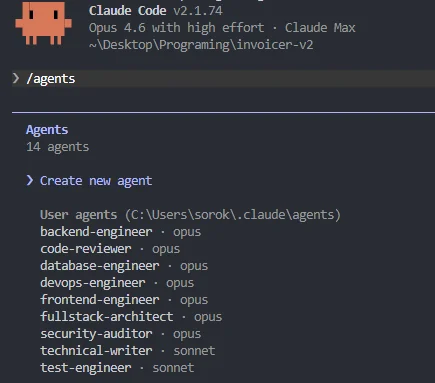
One of the biggest improvements in our workflow came from moving beyond a single "do everything" agent. We now run specialized subagents with distinct roles: a fullstack-architect that plans structure and makes technology decisions, a frontend-engineer and backend-engineer that handle implementation, a code-reviewer that audits every output for logic errors, naming consistency, and adherence to project standards, and a security-auditor that scans for vulnerabilities, exposed secrets, insecure dependencies, and unsafe data handling patterns.
The difference this makes is enormous. Before we introduced the code-reviewer and security-auditor agents, we were catching issues manually that should have been flagged automatically. Now, every piece of generated code passes through a review pipeline before we even look at it. It doesn't replace human review - we still read every line - but it filters out the obvious mistakes and lets us focus our attention on architecture, business logic, and edge cases that require human judgment.
Track Everything in Markdown - The AI Has No Long-Term Memory
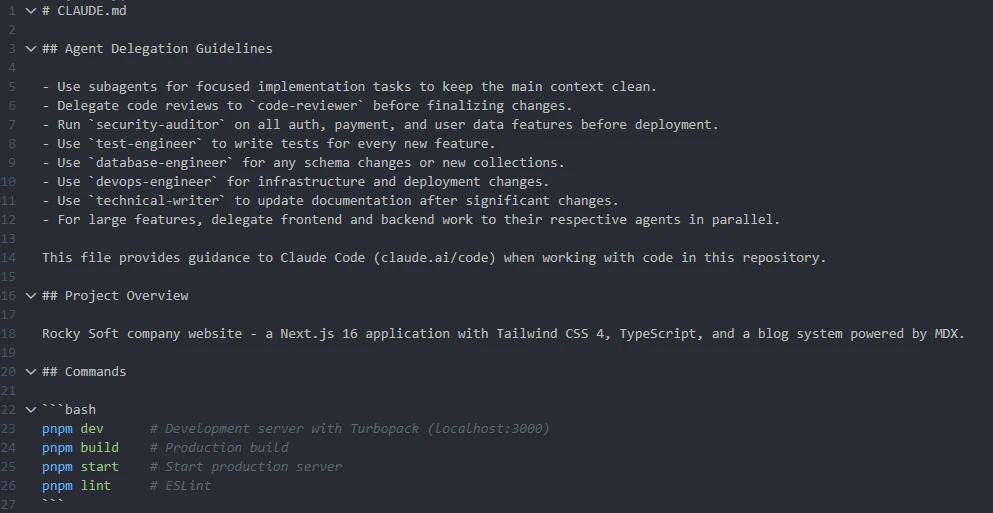
This is the part most teams skip, and it's the part that matters most across sessions. AI agents don't remember what they did yesterday. Every new session starts from zero context unless you deliberately provide it. We solve this with two critical files that live in every project repository:
A progress tracking file (we typically call it PROGRESS.md or name it after the feature) that documents what's been completed, what's in progress, what decisions were made and why, and what's next. Every time a session ends, the agent updates this file. Every time a new session starts, the agent reads it first. Without this, you get hallucinated continuations - the agent confidently picks up where it thinks you left off, inventing context that doesn't exist.
A memory file (CLAUDE.md in our case, since we primarily use Claude Code) that retains project-level knowledge the agent needs across every session: tech stack decisions, architectural patterns, naming conventions, environment setup, API contracts, known gotchas, and anything else that would otherwise need to be re-explained every time. Think of it as the project's brain dump that the AI reads on startup. The more complete this file is, the less the agent drifts between sessions.
This isn't optional overhead - it's the difference between an agent that compounds knowledge over time and one that starts fresh every morning like a contractor with amnesia.
Feed It Fresh Docs - Stale Training Data Produces Stale Code
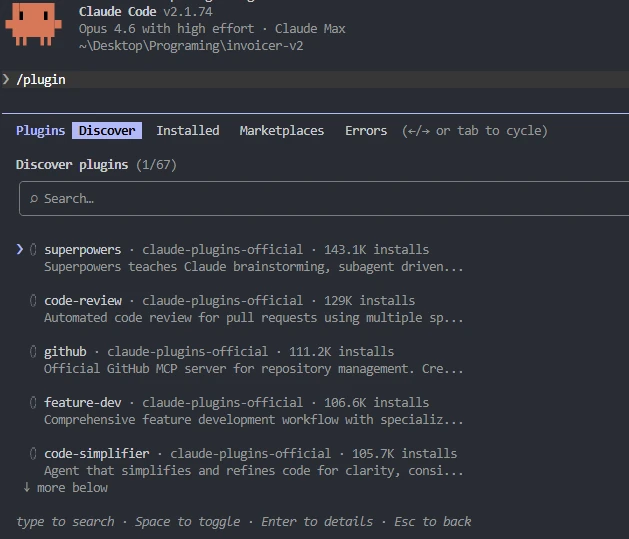
AI models have knowledge cutoffs. If you're working with a library that shipped a breaking change last month, the agent doesn't know about it unless you tell it. We use documentation plugins and MCP (Model Context Protocol) integrations to pipe current docs directly into the agent's context. This is especially critical for fast-moving ecosystems - React Native, Next.js, NestJS, and anything in the AI tooling space itself where APIs shift constantly.
The pattern is simple: instead of letting the agent guess based on training data from months ago, give it the actual current documentation as part of the context. The quality difference between an agent working from stale memory versus one with access to the latest docs is night and day. We've seen agents confidently produce code using deprecated APIs, removed configuration options, and outdated patterns - all of which looked perfectly valid until you tried to run it.
Write Technical Prompts, Not Feature Requests
The quality of AI output is directly proportional to the specificity of the input. There's a massive gap between a vague prompt and a technical one:
build me a user authentication systemimplement JWT-based authentication using Passport.js with a local strategy,
bcrypt for password hashing with 12 salt rounds, refresh token rotation
stored in Redis with a 7-day TTL, and rate limiting on the login endpoint
at 5 attempts per minute per IP using express-rate-limitThe first prompt gives the agent room to make dozens of assumptions - and it will, silently. The second prompt constrains the implementation to exactly what you need. The more you sound like a technical specification, the less room the agent has to hallucinate creative solutions you didn't ask for. We write our prompts closer to acceptance criteria than user stories, and the results are dramatically more predictable.
The Compound Effect
None of these practices work in isolation. Specialized agents catch issues that a single general-purpose agent misses. Memory and progress files prevent context loss between sessions. Fresh docs prevent outdated implementations. Technical prompts reduce hallucination surface area. Stack them together and you get an AI-assisted workflow that actually compounds in quality over time - each session building on a documented, reviewed, and verified foundation rather than starting from scratch.
Our output quality improved dramatically once all of these pieces were in place. The code-reviewer and security-auditor agents alone caught issues we would have spent hours debugging in production. But even with all of this infrastructure, you still need to understand the code. You need to read the diffs, grasp the architectural decisions, and know why the agent chose one approach over another. The tooling makes you faster - it doesn't make understanding optional.
Who Should Be Using Vibe Coding Right Now?
Vibe coding isn't for everyone yet - but it's for more teams than you might think.
It works best for teams that already have strong engineering fundamentals. If you have solid CI/CD pipelines, comprehensive test coverage, code review processes, and clear architectural standards, AI agents will amplify all of that. You'll ship faster without sacrificing quality.
It's risky for teams without those foundations. An AI agent doesn't care whether it's scaling good practices or bad ones. If your codebase is messy, your tests are sparse, and your deployment process is manual, vibe coding will generate problems faster than you can fix them.
It's not a replacement for developers - it's a force multiplier for good ones. The developer's role is shifting from writing code to directing intent, reviewing output, and making the judgment calls that AI can't. Demand for developers who understand AI-assisted workflows is increasing, not decreasing. But the bar is moving: the value is no longer in typing code. It's in knowing what code should do and verifying that it does.
The Bottom Line
AI coding agents are the most significant shift in software development since the cloud. The productivity gains are real, substantial, and available today to any team willing to integrate them thoughtfully. We use them on every project, and they make us meaningfully faster.
But "faster" is not the same as "better." Faster code generation without rigorous review, testing, and architectural oversight just means you produce bugs, security holes, and technical debt at a higher velocity. The teams that will win in 2026 and beyond are the ones that pair AI speed with human judgment - not the ones that hand the keys to the agent and hope for the best.
The technology is moving fast. The fundamentals of building reliable software haven't changed at all.
At Rocky Soft, we build production-grade web and mobile applications using React, Next.js, Node.js, NestJS, and React Native - with AI-assisted workflows integrated into every project. Based in Calgary, Alberta, we work with clients across Canada who need software that actually ships and actually works. Let's talk about your project.
Frequently Asked Questions
What is vibe coding?
Vibe coding is a software development approach where developers describe their desired outcome in natural language and let AI coding agents handle the implementation. The developer guides intent and reviews output, while the AI writes, refactors, and iterates on the code. The term was coined by AI researcher Andrej Karpathy in 2025.
What are the best AI coding agents in 2026?
The leading AI coding tools in 2026 include Claude Code (by Anthropic), Cursor, GitHub Copilot, Replit Agent, and Lovable. For professional development teams, Claude Code and Cursor are the strongest options for complex, multi-file projects that require autonomous reasoning and codebase-aware context.
Is vibe coding safe for production applications?
Vibe coding can be safe for production use, but only with proper engineering guardrails. AI agents can fabricate data, skip tests, and introduce unnecessary dependencies without warning. Production use requires mandatory code review, explicit test requirements, dependency lockdowns, and human oversight on every output.
Will AI replace software developers?
AI coding agents are not replacing developers - they're changing the role. Developers are becoming AI orchestrators who direct agents, validate results, and make strategic architectural decisions. Demand for developers with AI competence is increasing, but the value is shifting from writing code to understanding what code should do and verifying that it does.
How does vibe coding affect open-source software?
Vibe coding is creating strain on open-source ecosystems. When AI agents select and assemble packages without developers engaging with documentation or maintainer communities, the feedback loops that sustain open-source projects weaken. Major maintainers have begun closing external contributions due to floods of low-quality AI-generated submissions.
How do you configure AI coding agents for production-quality output?
The biggest quality gains come from running specialized subagents (code-reviewer, security-auditor, frontend-engineer, backend-engineer) rather than a single general-purpose assistant, maintaining memory and progress files in your repo so context persists between sessions, feeding current documentation into the agent via plugins or MCP integrations, and writing highly technical prompts that read like specifications rather than vague feature requests. Together, these practices dramatically reduce hallucination and drift.
Sources
- Williams, R. (2026). "Generative Coding: 10 Breakthrough Technologies 2026." MIT Technology Review. Read article
- Wiggers, S. (2026). "AI 'Vibe Coding' Threatens Open Source as Maintainers Face Crisis." InfoQ. Read article
- Volk, T. (2026). "Software Development in 2026: A Hands-On Look at AI Agents." TechTarget. Read article


